A location page is a page on your website for one office, with that office’s address, phone, hours, map, the people who work there, directions and reviews. Location pages help local SEO when each one is useful on its own: link each Google Business Profile to its page, write what is true about that office, and never publish copies with the city name swapped.
I build websites for dental practices, law firms and auto service centers, and location pages come up whenever a client has a second office or wants to reach a nearby town. They’re one of the few pages that can help in the map results and the normal results at the same time, and one of the easiest to get wrong. This guide covers what to put on them, the test Google applies, URLs, schema and how I’d build them in WordPress, with data from 77 real location pages. For the wider picture, start with my local SEO guide for small businesses.
What Is a Location Page?
A location page is the page on your site about one physical place where you serve customers. If you have three offices, you have three location pages, usually linked from a “Locations” page that lists them all.
There are two kinds, and they follow different rules:
| Office page | Town page (service area page) | |
|---|---|---|
| What it’s for | A real office, shop or clinic customers visit | A town you serve but have no office in |
| Linked from Google Business Profile | Yes, one profile per office | No |
| Can say “located in” | Yes | No, you serve it from elsewhere |
| Main risk | Copy-paste between offices | Becoming a doorway page |
Most of this guide is about office pages. Town pages get their own section further down, and my guide to local SEO for service area businesses covers them in depth.
Do Location Pages Help SEO?
Yes, when each page is real and useful. Three reasons:
- Your Google profile needs somewhere to point. Google’s Business Profile guidelines ask for a website “that represents your individual business location”. With two offices, sending both profiles to your homepage means neither lands on a page about that office.
- People search with a place in the query. “Dentist in Greer”, “family lawyer Bloomington”, “brake repair Akron”. A page about your office in that town is the most relevant page you can show them.
- It helps the visit turn into a call. Someone choosing between your two offices wants parking, hours and who they’ll see. A page that answers that saves a phone call, or wins one.
There’s first-hand proof on this site too. On a US dental implant practice I rebuilt, ten pages for the surrounding communities patients came from were built with directions, local reviews and the procedures those patients booked most. Together with one page per procedure and a cost page, the site went from an estimated 98 organic visits a month to 7,344 in about two years. The full case study has the chart. None of those ten pages was a template with the town name swapped.
What I Found on 77 Dental Location Pages
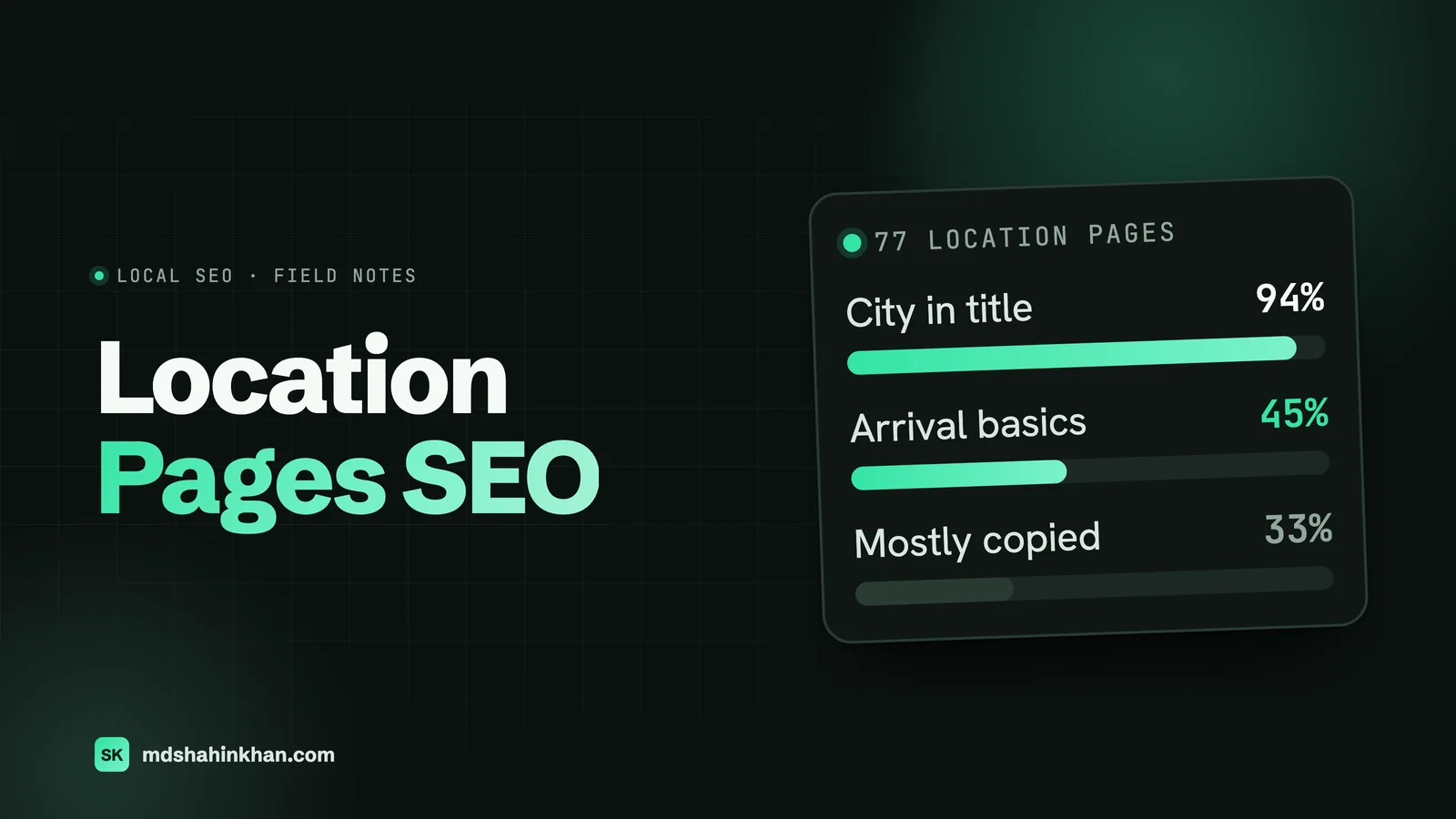
To see what real location pages look like, I took 90 random multi-office dental practices from my own lead research data (practices that showed up in Google Maps searches in 91 US metro areas, each website serving 2 to 12 cities). I found readable location pages for 37 of them, 77 pages in all, and checked what each page contained.
| On the location page | Share of 77 pages |
|---|---|
| City in the page title | 94% |
| City in the main heading | 88% |
| Tap-to-call phone link | 92% |
| Link to Google Maps | 82% |
| Embedded map | 27% |
| Street address | 78% |
| Opening hours | 60% |
| Business schema with the address | 58% |
| Directions, parking or landmarks | 58% |
| A dentist named | 49% |
| Reviews or testimonials | 48% |
What stood out:
- The SEO basics were nearly universal; the useful basics were not. Almost every page put the city in the title. But only 45% had all four of the things a patient needs to arrive: the address, a tap-to-call number, a map link and opening hours.
- A third were mostly copies. I compared each page with the practice’s other location pages, after masking the city names and removing text that also appears on the homepage. A third of the pages shared at least half of their wording with a sibling page, and one in six shared three quarters or more. The worst pair I opened by hand was one template with the city, phone number and list of nearby towns swapped.
- The complete page was rare. Only 3 of the 77 pages had the four basics, reviews, a named dentist, directions, and mostly unique text.
A note on method: I read the raw HTML (no JavaScript), matched pages by the city name in the URL, and dropped pages with too little readable text. Some practices name their pages differently, so this describes the pages I could find, not every practice.
The Doorway Test
Google’s spam policies name doorway pages as spam. Two of their examples describe bad location pages almost word for word: “pages targeted at specific regions or cities that funnel users to one page” and “substantially similar pages that are closer to search results than a clearly defined, browseable hierarchy”.
Five questions I ask before a location page goes live:
- Would this page exist if Google didn’t? A patient deciding which office to visit would want it. If the only reason is ranking, stop.
- Could I swap the city name and publish it for another office unchanged? If yes, it’s a copy.
- Does it answer something the homepage doesn’t? Address, parking, hours, the people at that office, what that office does most.
- Is everything on it true for this office? Services offered only at the main office shouldn’t be listed as if they’re everywhere.
- Can people find it by clicking? It should be linked from a Locations page and the menu, not hidden pages reachable only from search.
Shared text isn’t banned. Your insurance list or financing terms can be the same at every office. The problem is a page where the shared part is the whole page.
What to Put on a Location Page
This is the template I’d start from. The order matters: what a visitor needs to arrive goes first.
| Block | What goes in it | Why |
|---|---|---|
| Heading and opening line | “[Business] in [City]” and one sentence on what this office does | Matches the search, confirms they’re in the right place |
| Address, phone, hours | Full address, tap-to-call local number, hours including holidays | The four things people need to arrive |
| Map and directions | A link to the Google profile, plus parking, entrance, transit, nearby landmarks | The details only this page can give |
| Booking button | Book, call or request a consultation for this office | One clear next step |
| Who works here | Names, photos and short bios of the people at this office | People choose people |
| What this office does | The services offered here, linked to the full service pages | Honest, and links pass relevance |
| Photos | The building, the entrance, the waiting room, the team | Proves the place is real |
| Reviews | Two or three reviews that mention this office, with a link to its Google profile | Trust for this location |
| Local details | Languages spoken, accessibility, insurance taken here, areas patients come from | Questions people ask about this office |
| FAQ | Three to five questions people actually ask about this office | Answers before the call |
Length follows the content. In my data the middle page had about 760 words, and that’s a fair target, but 400 true words beat 1,200 padded ones.
Location Page Examples by Industry
What makes a page unique depends on the business. These are the details I’d ask a client for.
Dental Practices
- Which dentists and hygienists work at this office, and on which days
- Treatments offered here (implants or sedation may only be at one office)
- Parking, the entrance, elevator or step-free access
- Insurance plans and payment options accepted at this office
- Languages spoken by the team at this office
- Emergency hours, if this office has them
My guide to local SEO for dentists covers the Google profile side for each office.
Law Firms
- Which attorneys meet clients at this office, and whether it’s by appointment only
- The courthouses and counties this office handles cases in
- Practice areas handled from here
- Building access, parking, after-hours meetings
- Video consultation option for clients who can’t come in
One rule matters here: Google doesn’t allow a Business Profile for a virtual office. A shared office only qualifies if it has signage, receives clients and is staffed during business hours. A page for a town where you only rent a mailbox should be a town page, not an office page. My guide to local SEO for lawyers covers the profile setup for firms.
Auto Repair and Body Shops
- Services and equipment at this shop (alignment, diagnostics, EV work, calibration)
- Number of bays, typical wait time, drop-off and key-drop hours
- Loaner cars, shuttle or ride service from this shop
- Tow companies and insurers you work with locally
- Photos of the actual shop and the people at the counter
My guide to SEO for auto repair shops covers the rest of the local playbook for shops.
URLs, Titles and Internal Links
Keep the structure boring and consistent.
| Choice | What I use | Avoid |
|---|---|---|
| URL | /locations/greer/ | /best-dentist-greer-sc-dental-office/ |
| Page title | “Dentist in Greer, SC, [Business Name]” | A list of five cities in one title |
| Hub page | /locations/ listing every office with address and phone | Offices reachable only from the footer |
| Menu | “Locations” in the main menu | 50 city links in the footer |
| Google profile | Each profile’s website link goes to its own location page | Every profile pointing at the homepage |
| Internal links | Service pages link to the offices that offer them | Location pages that link nowhere |
Two details that matter more than they look:
- Name, address and phone must match the Google profile exactly, including the suite number. A different phone number on the page and the profile is a common cause of confusion, for both people and Google.
- Use the office’s own local number, not a central call center line, where you can. Google’s guidelines ask for the same.
LocalBusiness Schema for Each Location
Each location page should carry its own structured data with that office’s details. Google’s LocalBusiness documentation requires the address and recommends the most specific type, such as Dentist. A minimal example for one office:
{
  "@context": "https://schema.org",
  "@type": "Dentist",
  "name": "Example Family Dental, Greer",
  "url": "https://example.com/locations/greer/",
  "telephone": "+1-864-555-0100",
  "address": {
    "@type": "PostalAddress",
    "streetAddress": "100 Main St, Suite 2",
    "addressLocality": "Greer",
    "addressRegion": "SC",
    "postalCode": "29650",
    "addressCountry": "US"
  },
  "openingHoursSpecification": [{
    "@type": "OpeningHoursSpecification",
    "dayOfWeek": ["Monday", "Tuesday", "Wednesday", "Thursday"],
    "opens": "08:00",
    "closes": "17:00"
  }],
  "parentOrganization": {
    "@type": "Organization",
    "name": "Example Family Dental",
    "url": "https://example.com/"
  }
}
Use LegalService or Attorney for a law office and AutoRepair or AutoBodyShop for a shop. Don’t add star ratings from your own reviews in this markup: Google doesn’t show review stars for a business’s reviews about itself. Test each page in Google’s Rich Results Test after publishing.
Pages for Towns Without an Office
Many businesses want pages for nearby towns where they have no office. That can be fine, and it can be a doorway. The difference is honesty and substance:
- Say where you are. “Patients come to our Greer office from Taylors, about 15 minutes away” is honest. “Your Taylors dentist” with no office in Taylors is not.
- Only for towns you really serve, with something specific to say: the drive and the route, how many clients come from there, jobs you’ve done there (without customer details), reviews from people who live there.
- A handful, not fifty. Start with the three or four towns that send you the most customers.
For businesses that go to the customer (mobile mechanics, home services), the rules are a bit different. My guide to local SEO for service area businesses covers town pages for those businesses, including a table of thin versus useful content.
Building Location Pages in WordPress
From the build side, this is the setup I prefer:
- One template, unique content. Build the layout once, with fields for address, phone, hours, team, services, photos, directions and FAQ. Every field is then filled in by hand for each office. The template keeps pages consistent; the content keeps them different.
- A custom post type or child pages under /locations/. Either works. What matters is a clean hub page that lists every office and links to each one.
- No page generators. Plugins that create hundreds of city pages from one template produce exactly the “substantially similar pages” Google’s policy describes. If the content isn’t there, the page shouldn’t be either.
- Schema from the same fields. Generate the LocalBusiness markup from the address and hours fields, so the page and the markup can’t disagree.
- Watch the map’s weight. An embedded Google map loads a lot of extra code on a phone. A link to the office’s Google profile, or a static map image that opens the live map when tapped, keeps the page fast. In my data only 27% of pages embedded a map, while 82% linked to one.
Common Mistakes
- City-swapped copies. The most common problem in my data. If two pages read the same with the names masked, rewrite them.
- Listing every service at every office. If only one office does implants or DUI defense, say so.
- A footer full of city links. Fifty town names at the bottom of every page helps nobody and looks like a doorway network.
- The same three reviews on every page. Use reviews about that office.
- Profiles pointing at the homepage. Point each office’s Google profile at its own page.
- Pages for virtual offices or mailboxes. They don’t qualify for a Google profile, and calling them offices on your site misleads people.
- Stock photos of a building that isn’t yours. Use real photos of the office, even phone photos.
- Changing an office’s address on the page but not on the profile. Update both the same day.
Location Page Checklist
Before you build
- List every office customers can actually visit
- Collect for each: address, local phone, hours, team, services offered there, parking and access details
- Take real photos of each office and team
- Gather two or three reviews that mention each office
On every page
- City and business name in the title and main heading
- Address, tap-to-call number, map link and hours near the top
- The people who work there and the services offered there
- Directions, parking and entrance details
- Reviews about this office and a link to its Google profile
- LocalBusiness schema with this office’s details
- Less than half the text shared with any other location page
After you publish
- Link each Google Business Profile to its own location page
- Add every office to the /locations/ hub and the main menu
- Test the schema in the Rich Results Test
- Check the pages on a phone: fast, readable, one-tap call
Frequently Asked Questions
Are Location Pages Important for SEO?
Yes, for any business with more than one office. Each Google Business Profile needs a page that represents that location, and a page about your office in a town is the most relevant result for searches that name the town. They only help when each page is useful on its own; copied pages can be treated as doorway pages.
What Are Location Pages?
Location pages are pages on a business website for each physical location: one page per office, shop or clinic, with that location’s address, phone, hours, map, team, services and reviews. Pages for towns where you have no office are usually called service area pages or town pages.
What Is the 80/20 Rule in SEO?
It’s the Pareto idea applied to SEO: a small share of your pages, keywords or tasks usually brings most of the results. For location pages, it means a few well-built office pages and a few honest town pages do more than a large set of thin ones. Put your effort into the pages for the offices and towns that already bring most of your customers.
How Many Location Pages Should I Have?
One for every office customers can visit. Add town pages only for places you really serve and can write something specific about, usually a handful. There’s no number that ranks better; the right number is however many you can make useful.
Should My Google Business Profile Link to the Location Page or the Homepage?
To the location page. Google’s guidelines ask for a website that represents the individual location, and the location page is where someone who found that office on the map should land.
Can I Use the Same Content on Multiple Location Pages?
Some shared content is fine: insurance plans, financing, your approach to care. But each page needs enough content about its own office that it would still be useful if you removed the shared parts. If two pages read the same once you hide the city names, they need rewriting.
What Is the Difference Between a Location Page and a Service Area Page?
A location page is about an office customers can visit. A service area page is about a town you serve without having an office there. Office pages can say “located in” that town; service area pages should say where you are and how you serve that town.
Location pages are part of a local SEO system with your Google profile, reviews and service pages. My guide to getting more Google reviews covers the reviews side, and my pages on websites for dental practices, law firms and auto service centers show how I build sites with location pages that are fast and easy to keep up to date.
If you have more than one office and want me to look at your location pages and Google profiles, book a free 30-minute call and I’ll tell you what I’d fix first, whether or not we work together.