Local SEO for a service area business starts with a correctly set up Google Business Profile: your address hidden, up to 20 service areas, all within about two hours’ drive. After that, you rank best near the address you verified with, so you widen your reach with one solid page per service, honest pages for the towns you really work in, reviews that mention those towns, and listings on the sites that fill the rest of page one.
A service area business goes to the customer instead of the customer coming in: mobile mechanics, mobile auto glass, towing, plumbers, cleaners, locksmiths. I build websites for local businesses, including auto service businesses, and this is the group that gets the most confusing advice. My local SEO guide covers the basics for every business. This one is only about working without a storefront: what Google allows, where you can realistically rank, and what I found on page one for “mobile mechanic” in eight cities.
What Counts as a Service Area Business
Google’s own definition is simple: if you serve customers at their location and not at your address, you are a service area business, and you should hide your business address from customers. Its example is a plumber who runs the business from home.
There are three kinds:
| Type | Example | Address on Google |
|---|---|---|
| Service area business | Mobile mechanic working from home, plumber, cleaner | Hidden; service areas listed |
| Hybrid | A repair shop with a garage that also offers roadside service (Google’s own example) | Shown, plus service areas; the location must be staffed during your hours |
| Storefront | A dental office, a law office, a shop customers drive to | Shown; no service areas needed |
What isn’t allowed: P.O. boxes, mailboxes, and virtual offices (an address you rent but don’t work from). A coworking space only counts if it has your signage, your staff and receives customers during your hours. Renting an address in a bigger town just to appear there makes the profile ineligible.
What Ranks for “Mobile Mechanic” in 8 US Cities
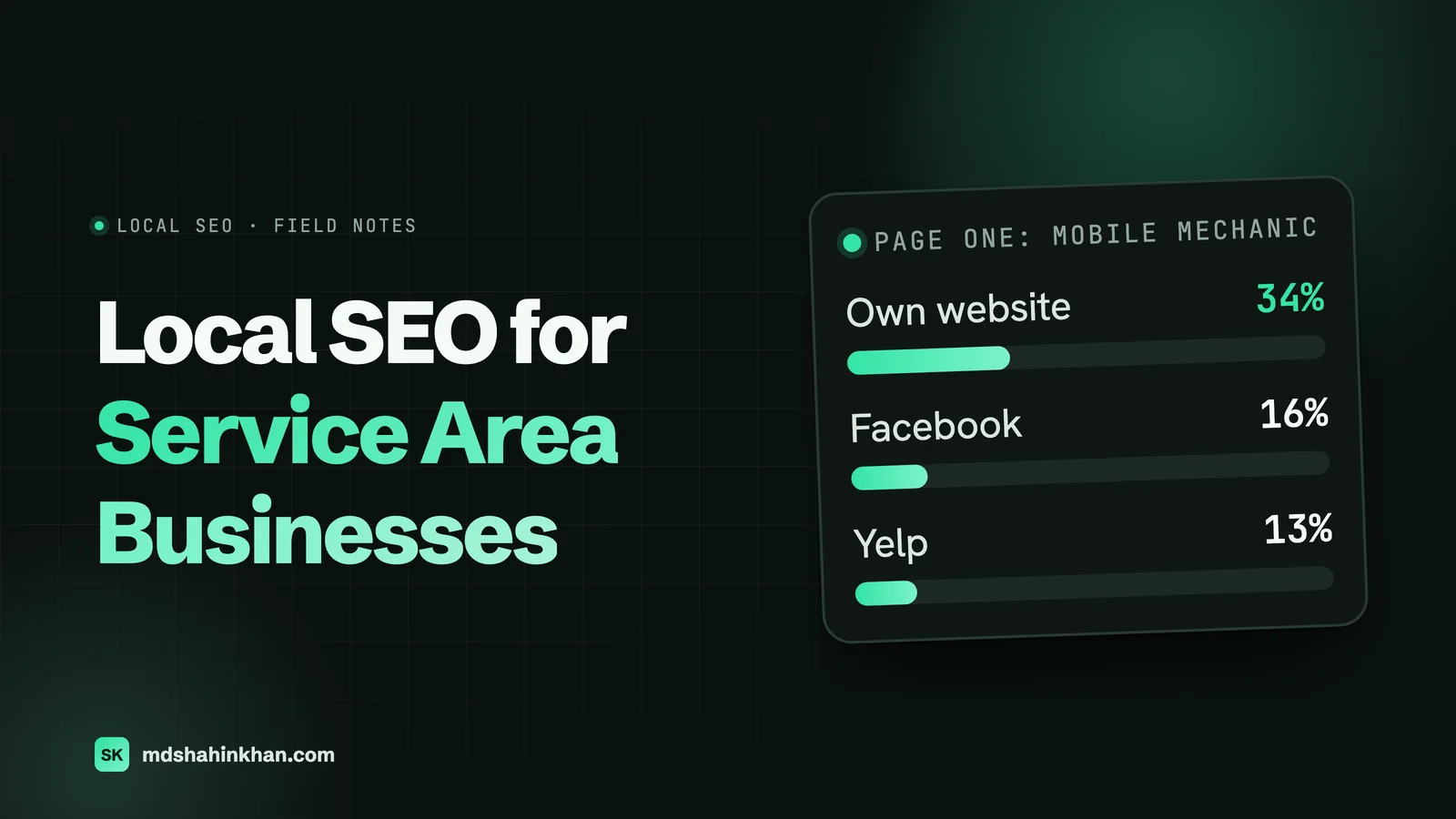
In November 2026 I pulled page one of Google (US) for “mobile mechanic” plus a city name in Phoenix, Dallas, Atlanta, Houston, Charlotte, Denver, Tampa and San Antonio. There were 62 results with a web address.
| Who ranked on page one | Results | Share |
|---|---|---|
| A mobile mechanic’s own website | 21 | 34% |
| Facebook (groups and business pages) | 10 | 16% |
| Yelp | 8 | 13% |
| Thumbtack | 7 | 11% |
| 6 | 10% | |
| Instagram, repair marketplaces and list sites | 10 | 16% |
Only about a third of page one was a mechanic’s own website. The rest belonged to platforms where customers ask for recommendations or compare providers. For a service area business, local SEO covers your website and your profiles on the sites Google already trusts for these searches.
Then I looked at the 21 mechanic websites for town pages (“Mobile Mechanic in Clearwater”, “Mobile Mechanic in Largo”). Three sites had several. I compared the text of each town page with the others on the same site, with the town names masked out:
- Site A, three town pages of about 800 words: 87% to 93% identical.
- Site B, four town pages of about 145 words: 91% to 96% identical.
- Site C, six town pages of 1,800 to 3,000 words: most were genuinely different, but one pair was 99% identical.
These sites rank today. But pages that are the same text with a new town name are exactly what Google’s spam policy calls doorway abuse: pages “targeted at specific regions or cities that funnel users to one page.” That is a risk you don’t need to take, and later in this guide I show what to put on a town page instead.
Set Up Your Google Business Profile Correctly
Your profile decides most of your visibility in the map results. The rules that matter for a business without a storefront:
- Verify with a real address. Google needs an address it can find to verify you, even if you hide it afterwards. For most owner-operators that is the home address.
- Hide the address if customers don’t come to you. Google says to remove it from the profile.
- Add up to 20 service areas by city, postal code or other area. You can’t set a radius around your base.
- Keep the whole area within about two hours’ drive of where you’re based. Google allows larger areas for some businesses, but that is the general rule.
- Pick the most specific primary category that matches your main service (for example “Mobile mechanic” if it is offered, otherwise the closest auto repair category), then add secondary categories for other services.
- Use your real business name. Adding “Best Mobile Mechanic Dallas” to the name breaks Google’s guidelines and invites suspension.
- Fill in services, hours and photos of real work: your van, your tools, jobs in progress.
Changes to service areas can take up to 48 hours to show.
Where You’ll Rank: Your Hidden Address Still Counts
This is the part most owners don’t expect. Google’s local ranking page names three factors: relevance, distance and prominence. It doesn’t say anything about service areas.
Tests by local SEO specialists fill the gap. Whitespark’s 2024 test found that “adding service areas to your Google Business Profile still has no impact on local rankings.” Their experience, and Sterling Sky’s, is that a hidden-address profile ranks from the address it was verified with. Google hasn’t confirmed this, but it matches what experts report. In Whitespark’s 2026 ranking factors survey, local SEO experts put “proximity of address to the point of search” second and “physical address in city of search” fourth, while “setting service areas in GBP” came 152nd of 187 factors.
What that means in practice:
- You’ll rank strongest near your base. Listing 20 towns doesn’t make you appear in the map pack in all of them.
- Showing your address won’t fix it. The same survey rates showing an address when you are a service area business as a negative factor, and it breaks Google’s rules if customers can’t visit. One Sterling Sky client did lose rankings after hiding the address, so expect a dip if you switch. Don’t solve it by breaking the rules.
- If you live in a small town far from the city, the map pack in the city will be hard to win. Your website, Local Services Ads and the platforms above are how you reach the city, while the map pack covers home.
- A second real location (staffed, with your sign, serving customers) is the honest way to rank in another area. A virtual office is not.
Service Area Pages That Aren’t Doorways
A town page earns its place when it would still be useful if search engines didn’t exist: when someone in that town learns something they couldn’t get from your homepage. A good test: could you swap the town name and publish the page for a different town without changing anything else? If yes, it’s a doorway.
| Thin town page (risky) | Useful town page |
|---|---|
| Same text as every other town, new name in the headings | What you do most in that town, and why |
| A list of every service you offer | The services people there ask for most, linked to the full service pages |
| No proof you’ve worked there | Jobs you did there, with photos (no customer details) |
| Generic “fast service” claim | Your typical arrival time in that town and the days you cover it |
| Stock photo of a car | Reviews from customers in that town |
| A map pin on a business with no address | Neighborhoods, roads or landmarks you actually cover |
How many town pages? Only as many as you can make genuinely different, and only for towns where you do real work. For most owner-operators that is a handful, not 50. Start with the three or four towns that bring the most jobs and write those well.
Service pages matter more than town pages. Someone searching “mobile brake repair” wants to know you do brakes, roughly what it costs and how soon you can come. One strong page per service, with pricing guidance and a click-to-call button at the top on mobile, does more than a page per town. My guides to SEO for auto repair shops and auto repair website design cover what those pages need.
Reviews That Mention the Town
Reviews help with prominence, and a review that mentions where the job was (“came out to my office in Largo”) shows Google and readers that you really work there.
- Ask every customer, the same day, with a direct link to your Google review form, by text.
- Don’t script the review or ask for particular words or town names. Google’s policy says businesses shouldn’t try to influence what a review says, and many customers mention the job and the town on their own.
- Never offer a discount for a review. The FTC’s rule on reviews bans rewards that depend on a review being positive, and Google’s review policy bans payment, discounts or free services in exchange for any review.
- Reply to every review, briefly and politely, without arguing.
Be on the Sites That Take Two Thirds of Page One
Since most of page one for “mobile mechanic” wasn’t mechanics’ own websites, profiles on those platforms are part of the job:
- Facebook business page: complete, with your service area, hours and the same phone number, and active in the local groups where people ask for recommendations (as yourself, helpfully, not with ads).
- Yelp: works with a hidden address; fill in the service area and categories.
- Thumbtack, Angi and Nextdoor: where homeowners request quotes. Check the lead fees before you commit.
- Apple Business Connect: Apple Maps feeds Siri and iPhone searches; set it up with the same details.
- Industry and town directories: the chamber of commerce, a trade association, a local business list.
Use the same business name, phone number and website on every listing. With a hidden address, consistency of name and phone matters even more.
Local Services Ads
Google’s Local Services Ads appear above everything else and charge per lead (a call or message), not per click. The categories include auto glass repair, auto repair shop, towing, tire shop, brake shop, oil change, plumbers and locksmiths. There is no “mobile mechanic” category, so check what your business qualifies for in your area before you sign up. Unlike the map pack, LSAs are designed to reach the area you set, which makes them one of the few ways a business based outside the city can show up there. Google is also moving LSAs into Google Ads as Performance Max campaigns with pay-per-lead goals, in phases from August 2026, so the setup screens may look different by the time you read this.
Schema Without a Public Address
Structured data tells search engines what you are. Schema.org has an areaServed property for “the geographic area where a service or offered item is provided”, which suits a service area business. One catch: Google’s own local business structured data guide requires an address and doesn’t list areaServed at all.
What I do on sites for businesses without a storefront: mark up the business and its services, list the towns served with areaServed, and keep the address to the city and postal code if the street address is private. Structured data is a small signal either way. It’s worth doing right, but it won’t make up for a weak profile or thin pages.
Measuring What Works
- Google Business Profile performance: calls, website clicks and the searches that showed your profile.
- Search Console: which service and town pages get impressions and clicks, and for which searches.
- Calls and bookings by page: set up tap-to-call and booking as events in Google Analytics so you know which pages produce jobs.
- Ask every new customer how they found you, and note the town. Over a few months that shows where the work really comes from.
Check once a month. If a town page brings no visits after three months, improve it or merge it into a stronger page.
Checklist
Google Business Profile
- Verified with a real address (no virtual office or P.O. box)
- Address hidden if customers don’t come to you
- Up to 20 service areas, all within about two hours’ drive
- Specific primary category, plain business name, real photos
Website
- One page per main service, with pricing guidance and tap-to-call at the top
- Town pages only for towns you really serve, each with its own jobs, reviews and arrival times
- Business and service structured data, with the towns you serve
Everywhere else
- Facebook, Yelp, Apple Business Connect and the quote sites your customers use, with the same name and phone number
- A same-day review request for every job
- Local Services Ads checked for your category
Frequently Asked Questions
Do Service Area Businesses Show Up on Google Maps?
Yes. A service area business with a hidden address still appears in the map results and on Google Maps, with its service area shown as an outline instead of a pin. In practice it ranks best near the address it was verified with, so it shows up most often for searches close to its base.
How Much Should I Pay for Local SEO?
For a one-person or small service business, most of the value is a one-off: a profile set up correctly, a page per service, a few honest town pages and fast pages on mobile. After that, the ongoing work is a review routine you can run yourself. My local SEO guide breaks down when a monthly retainer is worth it and when it isn’t.
How Much Does Local SEO Cost for a Small Business?
It depends on the city and how competitive your trade is, but the honest structure is the same: a one-off setup fee for the profile and website, then a small monthly cost or your own time for reviews and updates. A big monthly retainer mainly makes sense in a competitive metro where you need steady content and links.
Should I Show My Home Address on Google?
No, not if customers don’t visit you there. Google’s guidelines say a service area business should hide its address, and showing a home address you don’t serve customers from can get the profile suspended. Hiding it also keeps your home private.
How Many Service Areas Can I Add on Google?
Up to 20, by city, postal code or other area, and Google says the whole area should generally be within about two hours’ drive of your base. Adding more areas doesn’t improve your rankings; it only tells customers where you work.
Do I Need a Separate Page for Every City I Serve?
No. Write pages only for the towns where you do real work and have something specific to say: jobs you’ve done there, reviews from customers there, how quickly you arrive. Pages that repeat the same text with a different town name are treated as doorway pages under Google’s spam policy.
If you run a mobile or roadside business and want a website that turns local searches into calls, my page on websites for auto service centers shows how I build for this trade. If you’re not showing up on Google at all, start with my guide to why a website doesn’t show up on Google.
If you’d like me to look at your profile, your service and town pages and where you could realistically rank, book a free 30-minute call and I’ll go through it with you, whether or not we work together.