An ADA compliant website is one that people with disabilities can use: a screen reader can read it, it works with a keyboard alone, the text has enough contrast, and every form can be filled in. The ADA has no detailed website rulebook for private businesses, so in practice “compliant” means meeting WCAG 2.1 Level AA. Dental and law offices are named in the law itself.
I build and fix websites for dental practices, law firms and auto service centers, and accessibility questions now come up on almost every project, usually after the owner has heard of a demand letter sent to someone they know. This guide explains who the ADA covers, what the lawsuit risk really looks like, what I found when I tested 50 local business websites, and how to check and fix yours. I am a web developer, not a lawyer, so treat the legal sections as background and talk to an attorney about your own situation.
Does the ADA Apply to Your Website?
Title III of the Americans with Disabilities Act covers “public accommodations”, meaning businesses open to the public. The list in the law (42 U.S.C. § 12181) names, among other service establishments, the “office of an accountant or lawyer” and the “professional office of a health care provider”. A dental practice and a law firm are named directly; an auto repair shop falls under the same “service establishment” group.
The Department of Justice says plainly that the ADA applies to the websites of businesses open to the public. Its 2022 guidance lists “hospitals and medical offices” among its examples and adds that the DOJ “does not have a regulation setting out detailed standards”. Businesses have flexibility in how they make their sites accessible, but they must make them accessible.
You may also have read about a rule with deadlines in 2026. That rule, published in April 2024, covers state and local governments, not private businesses. It adopted WCAG 2.1 Level AA as the standard, and an interim final rule on 20 April 2026 moved its deadlines to April 2027 for larger governments and April 2028 for smaller ones. It does not change anything for a private dental practice, law firm or repair shop, but it does show which standard regulators reach for: WCAG 2.1 AA.
Can You Be Sued Over Your Website?
Yes. Small businesses get sued as well as big brands. The numbers from the two most cited trackers:
| What was counted | 2025 | Source |
|---|---|---|
| Website accessibility lawsuits in federal court | 3,117, up 27% from 2,452 in 2024 | Seyfarth Shaw, March 2026 |
| Share of all federal ADA Title III lawsuits that were about websites | 36% (3,117 of 8,667) | Seyfarth Shaw, March 2026 |
| Digital accessibility lawsuits in federal and New York and California state courts | More than 5,000 | UsableNet, 2025 year-end report |
Many claims start as a demand letter rather than a lawsuit. A federal ADA claim seeks a fix plus the plaintiff’s legal fees. In California the Unruh Civil Rights Act treats an ADA violation as a state violation too, with a minimum of $4,000 per violation, which is one reason so many cases are filed there. California courts have narrowed claims against purely online businesses, so the businesses most clearly exposed are the ones with a physical location, which is every practice, firm and shop reading this.
What I Found on 50 Local Business Websites
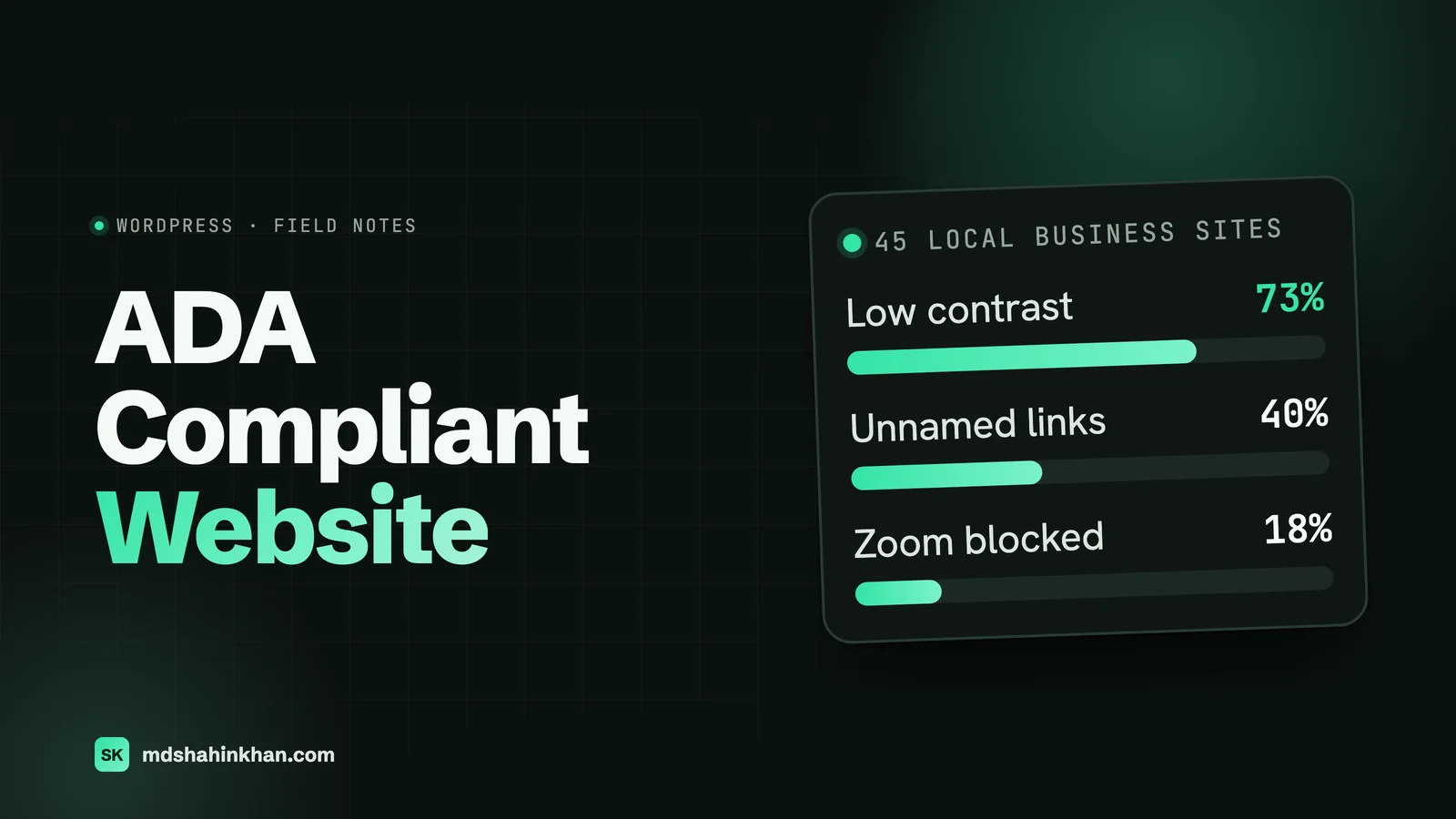
Published accessibility studies test big websites. I wanted to know how sites like my clients’ do, so on 18 October 2026 I took the page-one Google results for “dentist”, “personal injury lawyer” and “auto repair” in three mid-size US cities, Columbus, Tucson and Raleigh, kept only real local businesses (no directories, government sites, hospitals or national chains), and ran the same automated accessibility audit on each: Google Lighthouse, mobile. Five sites blocked the test or failed to load, which left 45: 15 dental practices, 17 law firms and 13 auto repair shops.
Every one of the 45 failed at least one automated accessibility check. Not one scored 100.
| Dental | Law | Auto repair | All 45 | |
|---|---|---|---|---|
| Sites tested | 15 | 17 | 13 | 45 |
| Failed at least one check | 15 | 17 | 13 | 45 (100%) |
| Median accessibility score | 89 | 90 | 90 | 90 |
| Average score | 89 | 89 | 85 | 88 |
The problems that came up most often:
| Problem found | Sites | Share |
|---|---|---|
| Text with too little colour contrast | 33 | 73% |
| Headings that skip levels | 23 | 51% |
| No “main” landmark for screen readers | 19 | 42% |
| Links with no readable name (icon links, “click here” images) | 18 | 40% |
| Embedded maps or videos with no title | 11 | 24% |
| Pinch-to-zoom switched off on phones | 8 | 18% |
| Buttons and links too small to tap | 8 | 18% |
| Images with no alt text | 6 | 13% |
| Buttons with no readable name | 5 | 11% |
Two things stand out. First, a score of 90 sounds good and is not: these sites rank on page one and look professional, and the same small set of problems is on almost all of them. Second, none of these problems is hard to fix. Contrast is a colour change, a link name is a few words, a map title is one attribute.
A caveat that matters: automated tools catch only part of the problems a person with a disability actually runs into. A site can score 100 and still have a booking form nobody can complete with a keyboard. Treat a score as a smoke alarm, not a certificate.
What “ADA Compliant” Means in Practice
Because the ADA does not set a technical standard for businesses, courts, settlements and the DOJ all point to the Web Content Accessibility Guidelines (WCAG). Version 2.1 at Level AA is the usual target, and WCAG 2.2 adds a few more checks on top. In plain words, WCAG 2.1 AA asks that:
- Text can be seen. Body text has a contrast ratio of at least 4.5 to 1 against its background, and nothing important is shown by colour alone.
- Images are described. Every meaningful image has alt text; decorative images are hidden from screen readers.
- Everything works with a keyboard. Menus, sliders, forms and pop-ups can be reached and used with Tab and Enter, and you can see where the focus is.
- Forms are labelled. Every field has a visible label, required fields say so, and errors explain what to fix.
- Pages have structure. One H1, headings in order, a main content area, and a page language set.
- Media has alternatives. Videos have captions, and nothing flashes.
- It works zoomed and on phones. Text can be enlarged to 200% without breaking, and pinch-to-zoom is never disabled.
The Six Problems Behind Most Failures
WebAIM tests the home pages of the top one million websites every year. In its 2026 report, 95.9% had detected WCAG failures, with an average of 56 errors per page, and six problem types accounted for almost all of them:
| Problem | Share of home pages (WebAIM Million, 2026) | The fix |
|---|---|---|
| Low contrast text | 83.9% | Darken the text or lighten the background until it passes 4.5 to 1 |
| Images with no alt text | 53.1% | Describe what the image shows and why it is there |
| Form fields with no label | 51% | Add a visible label tied to each field |
| Empty links | 46.3% | Give icon links (phone, social, menu) a text name |
| Empty buttons | 30.6% | Same: every button needs a name a screen reader can say |
| No page language | 13.5% | One attribute in the page header |
The overlap with my 50-site scan is close: contrast tops both lists, and 38 of the 45 local sites (84%) had at least one of these six. If you fix only these six, you remove most of what automated scans and demand-letter firms look for.
How to Check Your Website
You can get a useful first picture in half an hour without paying for anything:
- Run an automated scan. In Chrome, open your home page, press F12, choose the Lighthouse tab and run an Accessibility report. WAVE, a free checker from WebAIM, shows the same problems marked on the page itself. Check your home page, a service page, your contact page and your booking or intake form.
- Put the mouse away. Press Tab from the top of the page. Can you reach the menu, every link and every form field, and can you always see where you are? Can you submit the form and read the error message?
- Zoom to 200%. Does the text reflow, or does it overlap and disappear off the side?
- Turn on a screen reader for five minutes. VoiceOver on a Mac or iPhone, or NVDA on Windows (free). Listen to your home page. Do the links and buttons make sense when you hear them out of context?
- Look at your PDFs. Intake forms and menus uploaded as scanned images are unreadable to a screen reader.
If the automated scan shows problems and the keyboard test gets stuck anywhere, especially on the contact or booking form, that is where to start.
How to Make Your Website ADA Compliant
The order I work in on client sites:
- Fix the template, not the pages. Contrast, heading order, link names, the main landmark, skip link and zoom settings live in the theme or page builder settings. Fix them once and every page improves.
- Fix the forms. Labels, required markers, error messages, keyboard access, and a confirmation a screen reader announces. The form is where an inaccessible site actually loses you a patient or a client. Dental practices also need forms that protect patient data; my guide to HIPAA and your dental website covers that side.
- Fix the content. Alt text on every meaningful image, descriptive link text instead of “click here”, captions on videos, real text instead of text inside images, accessible PDFs.
- Check third-party widgets. Chat widgets, booking tools, review carousels and embedded maps are often the worst offenders. Ask the vendor for their accessibility conformance report, and give embedded maps and videos a title.
- Publish an accessibility statement. A short page saying which standard you aim for (WCAG 2.1 AA), when you last tested, and how someone can reach you if they have trouble, by phone and email. It shows good faith and gives people a route other than a lawyer.
- Test again after every change. New pages, new plugins and theme updates bring problems back. A quick scan after each change is the cheapest insurance there is.
On a WordPress site most of this is ordinary build discipline. Building to WCAG 2.1 AA from the start is what my law firm website design and dental website design guides recommend, and it adds almost nothing to the cost when it is done during the build.
Why an Overlay Widget Is Not the Answer
Accessibility overlays are the small widgets that add an icon to the corner of your site and promise compliance with one line of code. They are tempting because they are cheap and fast. They do not fix the underlying code, and the Federal Trade Commission has acted on the claims: in April 2025 it approved a final order requiring accessiBe, one of the best known overlay vendors, to pay $1 million and barring it from claiming its automated products can make any website WCAG compliant, or keep it compliant, without evidence. The FTC’s complaint alleged that its widget “did not make all user websites WCAG-compliant”.
The DOJ’s own guidance says automated tools and overlays “need to be used carefully” and that a clean automated report does not mean a site is accessible. An overlay does not stop lawsuits either: UsableNet’s 2025 figures, as reported by several accessibility firms, count more than 1,400 lawsuits against websites that had an accessibility widget installed. Spend the money on fixing the site instead.
What It Costs to Make a Website Accessible
Costs depend on the size and state of the site, so treat these as rough bands for planning, not quotes. Ask for a fixed price based on a scan of your own site:
| Situation | What the work involves | Typical cost with a freelance developer |
|---|---|---|
| New site built accessible from the start | Accessible design system, forms, testing before launch | Little or nothing extra on the build price |
| Small existing site with common problems (5 to 15 pages) | Contrast, link names, headings, alt text, forms, zoom, statement | A few hundred to about $1,500 |
| Larger site, custom widgets or many PDFs | The above plus booking or intake tools, PDFs, video captions | $1,500 to $5,000 and up |
| Formal audit by an accessibility firm | Manual testing against every WCAG criterion with a written report | Usually more than the fixes on a small site |
The cheapest point to do it is the build. If you are planning a new site anyway, my guide to what a small business website costs covers the rest of the budget, and accessibility should be a line in that quote, not an add-on later.
Your Accessibility Checklist
Template and design
- Body text contrast at least 4.5 to 1, including text over images and buttons
- Links look like links without relying on colour alone
- One H1 per page, headings in order, a main landmark and a skip link
- Pinch-to-zoom allowed and text readable at 200%
- Buttons and links at least 24 by 24 pixels, ideally larger, on phones
Content
- Alt text on every meaningful image; decorative images hidden
- Link text that makes sense out of context; icon links have names
- Captions on videos; titles on embedded maps and videos
- Real text, not text inside images; accessible PDFs or web pages instead
Forms and widgets
- Every field has a visible label; errors explain what to fix
- The whole form works with a keyboard, including date pickers and dropdowns
- Chat, booking and review widgets tested with a keyboard and screen reader
Ongoing
- An accessibility statement with a phone number and email
- A quick scan after every new page, plugin or theme update
- A full keyboard and screen reader test once a year
Frequently Asked Questions
How Do I Make My Website ADA Compliant?
Aim for WCAG 2.1 Level AA. Start with the template (contrast, headings, link names, zoom), then the forms, then the content (alt text, link text, captions, PDFs), then third-party widgets, and publish an accessibility statement. Test with an automated scan, a keyboard and a screen reader, and test again after every change.
Can You Be Sued If Your Website Is Not ADA Compliant?
Yes. Seyfarth Shaw counted 3,117 website accessibility lawsuits in federal court in 2025, and UsableNet counted more than 5,000 across federal and New York and California state courts. Small local businesses are included. Many claims start with a demand letter, and the costs include fixing the site and paying the plaintiff’s legal fees. This is not legal advice; speak to an attorney if you receive a letter.
How Can I Check If My Website Is ADA Compliant?
Run a free automated scan (Lighthouse in Chrome, or WAVE), then test by hand: use the site with only a keyboard, zoom to 200%, and listen to a page with a screen reader such as VoiceOver or NVDA. Automated tools find only part of the problems, so a clean scan is a good sign, not proof.
What Websites Have to Be ADA Compliant?
The websites of businesses open to the public under Title III of the ADA, which names lawyers’ offices and health care providers’ offices among others, and the websites of state and local governments under Title II. Courts have differed on purely online businesses, but a business with a physical office or shop is the clearest case.
Does an Accessibility Widget Make My Website ADA Compliant?
No. Overlay widgets do not fix the underlying code. In 2025 the FTC ordered accessiBe to pay $1 million and stop claiming its automated product can make any website WCAG compliant without evidence, and the DOJ warns that automated tools need to be used carefully. Fix the site itself.
Is There an Official ADA Compliance Certificate for Websites?
No. Neither the DOJ nor any government body certifies websites as ADA compliant. What you can have is evidence: a record of testing against WCAG 2.1 AA, the fixes made, an accessibility statement, and a way for people to report problems. Be wary of anyone selling a “certificate”.
Accessibility work also pays off outside the legal question: clear contrast, labelled forms and pages that work on any phone are easier for every visitor to use, and they tend to load faster too, which my WordPress speed guide covers. You can see how I build for each industry on my pages for dental practices, law firms and auto service centers, and my local SEO guide covers how the site and your Google profile work together.
If you want to know where your own site stands, book a free 30-minute call and I will run the same checks on it with you, whether or not we work together.