Dental social media marketing works when a practice posts regularly on one or two platforms its patients already use (Facebook and Instagram for most offices), shows real people and real answers instead of stock graphics, follows HIPAA and FTC rules on patient photos and reviews, and sends every post to a page where people can book. Consistency matters more than volume.
I build websites for dental practices, so I see social media from the other end: the moment someone taps a link in a practice’s bio and lands on the site. That moment is where most practices lose them. This guide covers what I found when I checked 50 dental practice websites, which platforms are worth your time, what to post, the rules most guides skip, and how to connect it all to bookings. For the bigger picture, my guide to dental marketing strategies covers SEO, ads, reviews and referrals as well.
What I Found on 50 Dental Practice Websites
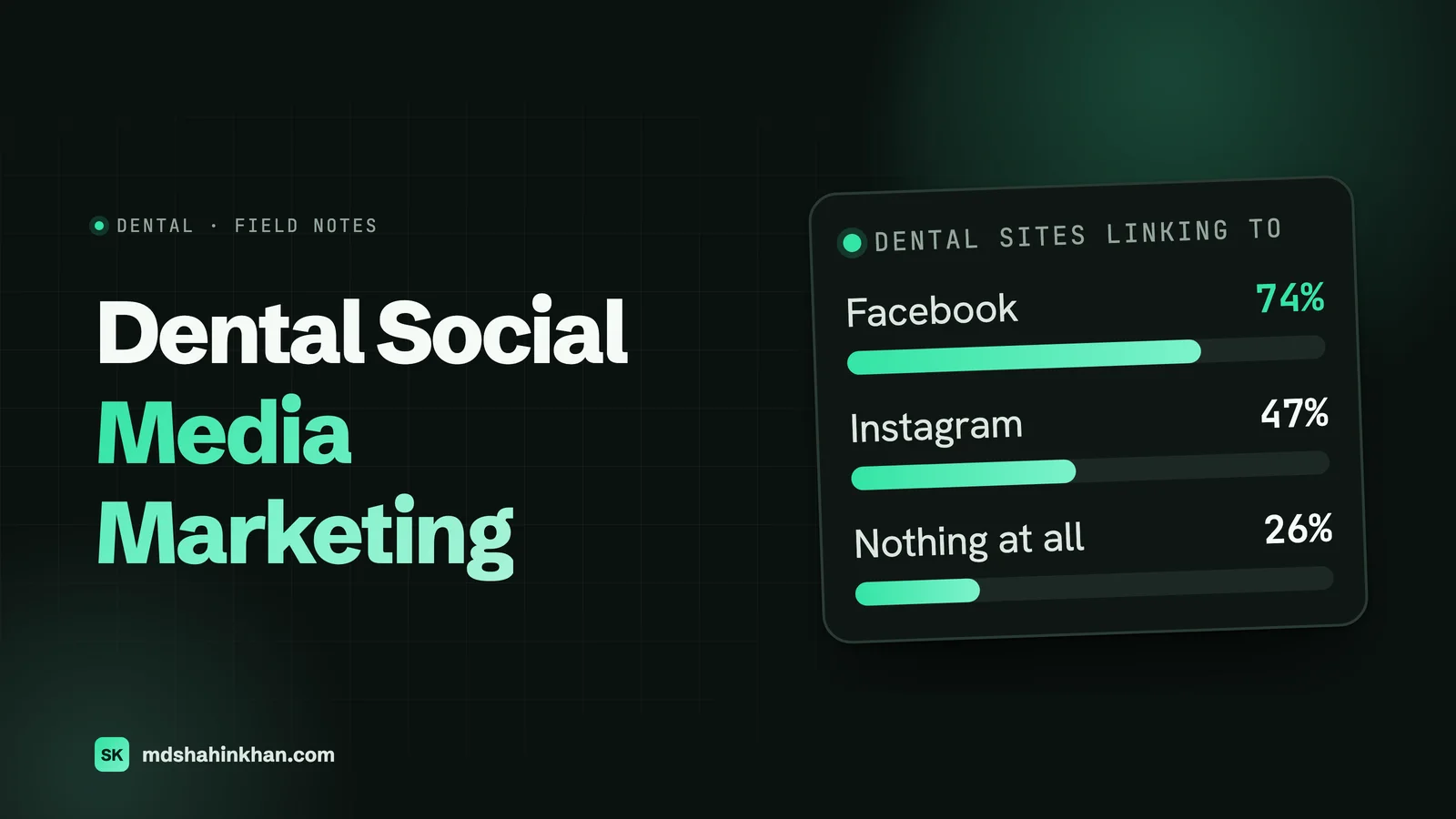
In November 2026 I took the dental practices on the first page of Google for “dentist” in nine US cities: Columbus, Tucson, Raleigh, Boise, Omaha, Knoxville, Spokane, Richmond and Albuquerque. I left out directories, insurers and chains, which gave me 50 independent practices. Then I checked which social accounts each homepage links to. Fifteen sites blocked automated checks and one didn’t respond, so the numbers below are for the 34 I could read.
| Social link on the homepage | Practices | Share |
|---|---|---|
| 25 of 34 | 74% | |
| 16 of 34 | 47% | |
| YouTube | 7 of 34 | 21% |
| X (Twitter) | 4 of 34 | 12% |
| TikTok | 3 of 34 | 9% |
| 3 of 34 | 9% | |
| No social links at all | 9 of 34 | 26% |
Three things stood out:
- A quarter of these practices link to no social accounts at all, and they still rank on page one. Social media is not what gets a practice found on Google. It does other jobs, which I cover below.
- YouTube channels go quiet. Six practices linked a real YouTube channel (a seventh linked to youtube.com itself, not a channel). Only one of the six had uploaded a video in the last six months. The others last posted in June 2025, January 2024, May 2023 and March 2017, and one had no public videos at all.
- Links drift. One practice linked two different Facebook pages, one under another business name. Another linked an old Facebook page address and the dentist’s personal LinkedIn profile.
A stale channel is worse than none. A patient who clicks through and finds the last video from 2017 wonders whether the practice is still the same. Before you start anything new, check the links you already have.
Which Platforms Are Worth a Practice’s Time
Pew Research Center’s 2026 figures show who uses each platform. This is the share of US adults who use each one, by age:
| Platform | All adults | 18 to 29 | 30 to 49 | 50 to 64 | 65+ |
|---|---|---|---|---|---|
| YouTube | 84% | 95% | 91% | 85% | 65% |
| 70% | 69% | 78% | 71% | 59% | |
| 51% | 79% | 64% | 41% | 21% | |
| TikTok | 37% | 65% | 45% | 31% | 11% |
Here is how I read that for a dental office:
- Facebook reaches the people who book appointments for a whole family: adults 30 to 64. It is also where local community groups, events and reviews live. If you only do one platform, make it this one.
- Instagram is strongest under 50, which makes it the second platform for cosmetic work, Invisalign and orthodontics. Facebook and Instagram share one dashboard (Meta Business Suite), so one post can go to both.
- YouTube reaches almost everyone, but people use it to search, not scroll. A short video answering “What happens at a root canal?” can keep working for years. It suits a practice with a dentist who is comfortable on camera.
- TikTok is worth it only if someone on your team enjoys making short videos. It reaches younger patients, but it needs a steady flow of new clips.
- Google Business Profile isn’t social media, but it is where most local patients look first. Google still lets you publish updates, offers and events there, and says posts older than six months are archived unless you set a date range. Post there whenever you post on Facebook.
Pick one or two and do them well. An abandoned account says more about a practice than a missing one.
What to Post: A Simple Weekly Mix
Most dental pages fail in one of two ways: a burst of posts, then silence, or a feed of stock tooth graphics nobody stops to read. A simple weekly mix fixes both. Two or three posts a week is plenty for a single practice.
| Post type | What it does | How often |
|---|---|---|
| Team and office | Shows the people a nervous patient will meet | Weekly |
| Answers to real questions | The questions your front desk hears every day, answered in one post or one short video | Weekly |
| Patient stories (with written authorization) | Proof from people like them | Monthly |
| Community | Local events, school visits, sponsorships | Monthly |
| Practical reminders | Insurance benefits that reset in January, holiday hours, new services | When relevant |
15 Post Ideas That Don’t Need a Designer
- Introduce one team member a month: name, role, how long they’ve been with you and one thing they enjoy outside work.
- Film a 30-second walk-through of the office, from the front door to a treatment room.
- Answer “Does a filling hurt?” in under a minute.
- Explain what happens at a first visit, step by step.
- Show a piece of equipment and what it does for the patient, such as a digital scanner instead of goop impressions.
- Post your new-patient checklist: what to bring and how early to arrive.
- Remind people in October and November that unused insurance benefits often reset in January.
- Share a patient’s thank-you note (with written authorization).
- Show before-and-after photos (with written authorization, and following your state board’s rules).
- Post photos of the team at a local fundraiser, school visit or 5K.
- Celebrate a staff anniversary or a new certification.
- Run a myth or fact post: “Whitening damages your teeth: myth or fact?”
- Explain your emergency process: what to do with a knocked-out tooth and how to reach you after hours.
- Answer one question from a comment or a phone call, and say it came from a patient (no names).
- Show behind the scenes at your sterilization area. Patients like seeing how clean things are.
Every post that mentions a treatment should link to that treatment’s page on your website, not your homepage. More on that below.
Short Video Without a Video Team
Reels, TikTok and YouTube Shorts favour short vertical video. A phone and a quiet room are enough:
- Keep it short: 30 to 60 seconds, one question per video.
- Put the answer in the first sentence, then explain it.
- Add captions. Many people watch without sound, and captions also help viewers with hearing loss.
- Film several at once. One hour before a quiet afternoon can give you a month of clips.
- Keep patients out of the shot unless you have their written authorization, including the waiting room and monitors with patient information on screen.
The Rules: HIPAA, the FTC and Your State Board
This is the part most dental social media guides skip, and the one that can cost real money.
HIPAA and patient photos. A patient’s photo, name and story are protected health information. Using them on social media needs a signed HIPAA authorization (45 CFR 164.508). A general consent-to-treatment form is not enough. Full-face photos are on HIPAA’s list of identifiers (164.514), so cropping out a name doesn’t make a smile photo anonymous. In September 2025, a Delaware healthcare company agreed to pay $182,000 after posting patients’ names, photos and treatment details as “success stories” without written authorizations. It wasn’t a dental practice, but the rule is the same.
A good authorization form names exactly what you will post and where, says it can be withdrawn, and has a separate signature for minors from a parent or guardian. Keep it on file. My guide to a HIPAA-compliant dental website covers the website side of this.
The FTC on reviews. The FTC’s rule on consumer reviews and testimonials took effect in October 2024. It bans fake reviews (including AI-written ones), rewards that depend on a review being positive, and pressuring people to remove negative reviews. A contest that enters “everyone who leaves a 5-star review” crosses that line. The safest route is not to reward reviews at all.
The FTC on influencers. If you give a local influencer free whitening in exchange for a post, the connection has to be disclosed clearly. The FTC’s guide for influencers says plain words like “ad” or “sponsored” work, while vague tags like “collab” or “thanks” don’t. Since February 2025 the ADA Code of Ethics also says anyone endorsing a product or service must disclose paid partnerships.
Your state dental board. Boards set their own advertising rules, and they differ. Texas, for example, only allows testimonials from verifiable patients of record, and before-and-after photos need written consent plus the line “Actual results may vary.” Check your own state’s rules before you post patient stories, run referral rewards or advertise discounts.
Replying to Reviews and Comments Without a HIPAA Problem
Replying to reviews is good practice. Confirming that someone is your patient is not. Even “We’re sorry your crown didn’t fit” confirms a patient relationship and a treatment. In 2019 a Dallas dental practice paid $10,000 after its Yelp replies disclosed patients’ names and health details, and in 2022 a California practice paid $23,000 for the same mistake.
A safe reply to a negative review or comment looks like this:
Thank you for taking the time to share this. We take every concern seriously, and we’d like to talk with you directly. Please call our office manager at (555) 555-0100.
It thanks them, says nothing about any visit or treatment, and moves the conversation off the platform. The same applies to Facebook comments and Instagram messages: never discuss a person’s care in public, even if they bring it up first.
Paid Social: Boosted Posts and Meta Ads
Organic posts mostly reach people who already know you. To reach new people nearby, you pay. A few things to know before you spend:
- A boosted post is the easy version of a Meta ad. It’s fine for promoting a community event. For new patients, a proper campaign in Ads Manager gives you better control over location, age and where the click goes.
- Advertise one thing per campaign, such as a new-patient exam, Invisalign consultations or emergency appointments, and send the click to the page about that one thing.
- Health is not a special ad category on Meta. The special categories are housing, employment, financial products and politics. Meta can still restrict some tracking events for health-related advertisers, which makes it harder to measure bookings inside Meta. Check Events Manager for a restriction notice before you rely on its conversion numbers.
- Start with a small, fixed test. Run it for a few weeks and judge it by new-patient calls and bookings, not likes.
I’m not going to quote a “cost per new patient” here. Every number I’ve seen published comes from an agency selling ads, without a stated method, and the real figure depends on your city, your offer and your website.
Send Social Traffic Somewhere That Books
This is my part of the job, and it’s where most practices lose people. Almost all social traffic comes from phones. Someone taps the link in your bio, waits for a slow homepage, can’t find the booking button, and leaves.
What I set up on dental sites:
- One link in the bio that goes to a booking page, not the homepage. If you use a link page, put “Book an appointment” first and keep it to four or five links.
- A matching page for every promotion. An Invisalign post goes to the Invisalign page with the booking button on screen.
- UTM tags on every link you post, such as
?utm_source=instagram&utm_medium=social&utm_campaign=invisalign. Google Analytics then shows exactly which posts brought visitors and bookings. - Tap-to-call and online booking at the top of every page on mobile. My guide to dental website design goes through the rest of a page that converts.
- Fast pages. People coming from social are impatient. A page that takes several seconds to load on a phone loses them before your offer appears.
- No embedded social feeds on the homepage. Instagram and Facebook feed widgets load a lot of outside code, slow the page and add little. A plain link to your profile does the job.
Who Runs It, and How Much Time It Takes
For a single practice, three options work:
| Option | Works when | Watch out for |
|---|---|---|
| A team member, a few hours a week | Someone enjoys it and knows the patients | It slips during busy weeks; give it a fixed slot on the schedule |
| The dentist on camera, a team member editing | You want video and expertise to show | The dentist’s time; batch filming once a month |
| An agency or freelancer | No one in-house has the time | Generic graphics that could be any practice; ask who writes the posts and how they handle HIPAA |
Whoever runs it needs three things from you: a short list of what can’t be posted (patients without authorization, prices that change, anything about a specific person’s care), a folder of authorized photos, and someone to approve replies to reviews.
Measuring What Works
Likes don’t pay the rent. Track these instead:
- Website visits from social, broken down by the UTM tags on your links (Google Analytics).
- Bookings and calls from those visits. Set up online booking and tap-to-call as events in Google Analytics.
- “How did you hear about us?” on the new-patient form, with Facebook, Instagram, TikTok and YouTube as separate options.
- Messages and calls that mention a post. Ask the front desk to note them.
Review it once a month. If a platform brings no visits or bookings after three months of steady posting, put that time into the platform that does.
A 30-Day Starter Plan
Week 1: clean up
- Check every social link on your website and fix or remove dead, duplicate or old ones
- Remove or hide accounts you no longer post on
- Update profile photos, hours, address, phone number and the bio link to your booking page
Week 2: set the rules
- Adopt a written HIPAA authorization form for photos, stories and video
- Write a one-page social media policy: what never gets posted, who approves review replies
- Check your state dental board’s advertising rules
Week 3: build a backlog
- Film eight short question-and-answer videos in one session
- Photograph the team and the office (no patients in shot)
- Draft four weeks of posts using the weekly mix above
Week 4: connect and measure
- Add UTM tags to every bio and post link
- Set up booking and call tracking in Google Analytics
- Add “How did you hear about us?” to the new-patient form
Frequently Asked Questions
How to Do Social Media Marketing for Dentists?
Choose one or two platforms your patients use (Facebook first for most practices, Instagram second), post two or three times a week using a mix of team, answers to common questions and community posts, and link every post to a page where people can book. Get written authorization before posting any patient, reply to reviews without revealing anything about a patient, and measure bookings rather than likes.
How to Do Social Media Marketing for Dentists in 2026?
The basics haven’t changed, but short vertical video now reaches more people than still images on most platforms, and the rules are stricter. The FTC’s review rule has applied since October 2024, and the ADA Code has asked for disclosure of paid influencer partnerships since February 2025. Keep videos short, captioned and free of patient information.
What Are Some Creative Social Media Ideas for Dental Marketing?
A monthly team-member spotlight, a 30-second office walk-through, myth-or-fact posts, quick answers to the questions your front desk hears most, a reminder before insurance benefits reset, and photos from local community events. Ideas that show real people work better than stock graphics.
Can Dentists Post Patient Photos on Social Media?
Yes, but only with a signed HIPAA authorization that covers social media. A general treatment consent form isn’t enough. Full-face photos count as identifying information under HIPAA, and some state dental boards add their own rules, such as Texas requiring the line “Actual results may vary” on before-and-after photos.
How Often Should a Dental Office Post on Social Media?
Two or three times a week on each platform you use is plenty for a single practice. A steady schedule you can keep up beats a burst of daily posts followed by silence. Batch your filming and photos once a month so posting doesn’t depend on a quiet afternoon.
Should a Dental Practice Be on TikTok?
Only if someone on the team enjoys making short videos and can post regularly. TikTok reaches younger adults (Pew puts it at 65% of 18 to 29 year olds), which suits orthodontics and cosmetic work. For most family practices, Facebook and Instagram come first.
If you want a website that turns social media visits into booked appointments, my page on websites for dental practices shows how I build for dentists. For getting found on Google Maps, see my local SEO guide, and for the high-value end of the schedule, my guide to dental implant marketing.
If you’d like me to check where your social links send patients and whether your site turns those visits into bookings, book a free 30-minute call and I’ll go through it with you, whether or not we work together.