Pick Wix or Squarespace if you want a good-looking site online this week, plan to edit it yourself, and never want to think about hosting or updates. Pick WordPress if the website has to bring in customers through Google, will grow past a handful of pages, or needs to stay yours if you ever change provider. Squarespace suits design-led businesses, Wix suits owners who want the most freedom without code, and WordPress suits businesses that treat the site as a sales channel.
I build websites on WordPress and stores on Shopify, and a good part of my work is looking at sites that started on Wix or Squarespace and asking whether they should move. None of the three is bad. Each one is wrong for a particular kind of business, and most comparisons never say which. This guide covers what each one costs over three years with the arithmetic shown, who keeps it running, the SEO and speed differences as a developer sees them, what you can take with you when you leave, and which one I would pick for a dental practice, a law firm, a repair shop or a portfolio.
A note on names before we start: “WordPress” here means the free, self-hosted software from WordPress.org that you install on your own hosting. WordPress.com is a hosted service built on it, with its own plans and limits, and is closer to Wix and Squarespace in how it works.
Wix vs WordPress vs Squarespace at a Glance
| Wix | Squarespace | WordPress | |
|---|---|---|---|
| What it is | A hosted website builder you rent monthly | A hosted website builder you rent monthly | Free software you install on hosting you choose |
| Entry price for a site on your own domain | $17 a month on a yearly plan | $16 a month on a yearly plan | Hosting from about $3 a month, renewing higher |
| Free plan | Yes, with Wix ads and a Wix web address | No, a free trial only | The software is free; hosting is not |
| Hosting, security, updates | Wix’s job | Squarespace’s job | Yours, or your developer’s |
| Editor | Drag anything anywhere | Structured sections, harder to break | Depends on the theme or page builder |
| Design freedom | High inside Wix’s limits | Medium, polished templates | Unlimited |
| Extending it | Wix App Market | A small set of extensions | Tens of thousands of plugins |
| Moving your site elsewhere | Not possible; rebuild required | Partial export to WordPress | Full export, any host |
| Share of all websites (W3Techs, September 2026) | 4.2% | 2.4% | 40.2% |
| Best for | Owners who want freedom without code | Design-led and portfolio businesses | Businesses that grow through search and content |
What Each One Costs Over Three Years
Plan prices are the smallest part of the decision, but they are the part everyone asks about first, so here they are. These are US prices from 2026 pricing reviews that match the builders’ own pages; both Wix and Squarespace show local prices by country and change them from time to time, so check the current page before you budget.
| Plan (US, yearly billing) | Price a month | Paid monthly instead |
|---|---|---|
| Wix Light | $17 | $24 |
| Wix Core | $29 | $36 |
| Wix Business | $39 | $46 |
| Squarespace Basic | $16 | $25 |
| Squarespace Core | $23 | $36 |
| Squarespace Plus | $39 | $56 |
| WordPress hosting, Hostinger Premium | $2.99 on a 48-month term, renews at $10.99 | Not offered at that price |
Squarespace’s Basic plan also takes 2% of product sales; Core and above do not. Wix and Squarespace both include a free domain for the first year on yearly plans, and so does most WordPress hosting.
Three Years for a Small Service Business
Say you run a service business: 10 to 15 pages, a contact form, a blog you post to now and then, no online store. These are my assumptions, shown so you can put in your own numbers. I used the cheapest ad-free plan on each builder, because that is enough for a site like this.
| Cost over three years | Wix Light | Squarespace Basic | WordPress |
|---|---|---|---|
| Plan or hosting | $612 (3 × $204) | $576 (3 × $192) | $143.52 (48 months paid up front) |
| Domain after the free first year (about $20 a year) | $40 | $40 | $40 |
| Page builder licence (my assumption: Elementor Pro, about $60 a year) | $0 | $0 | $180 |
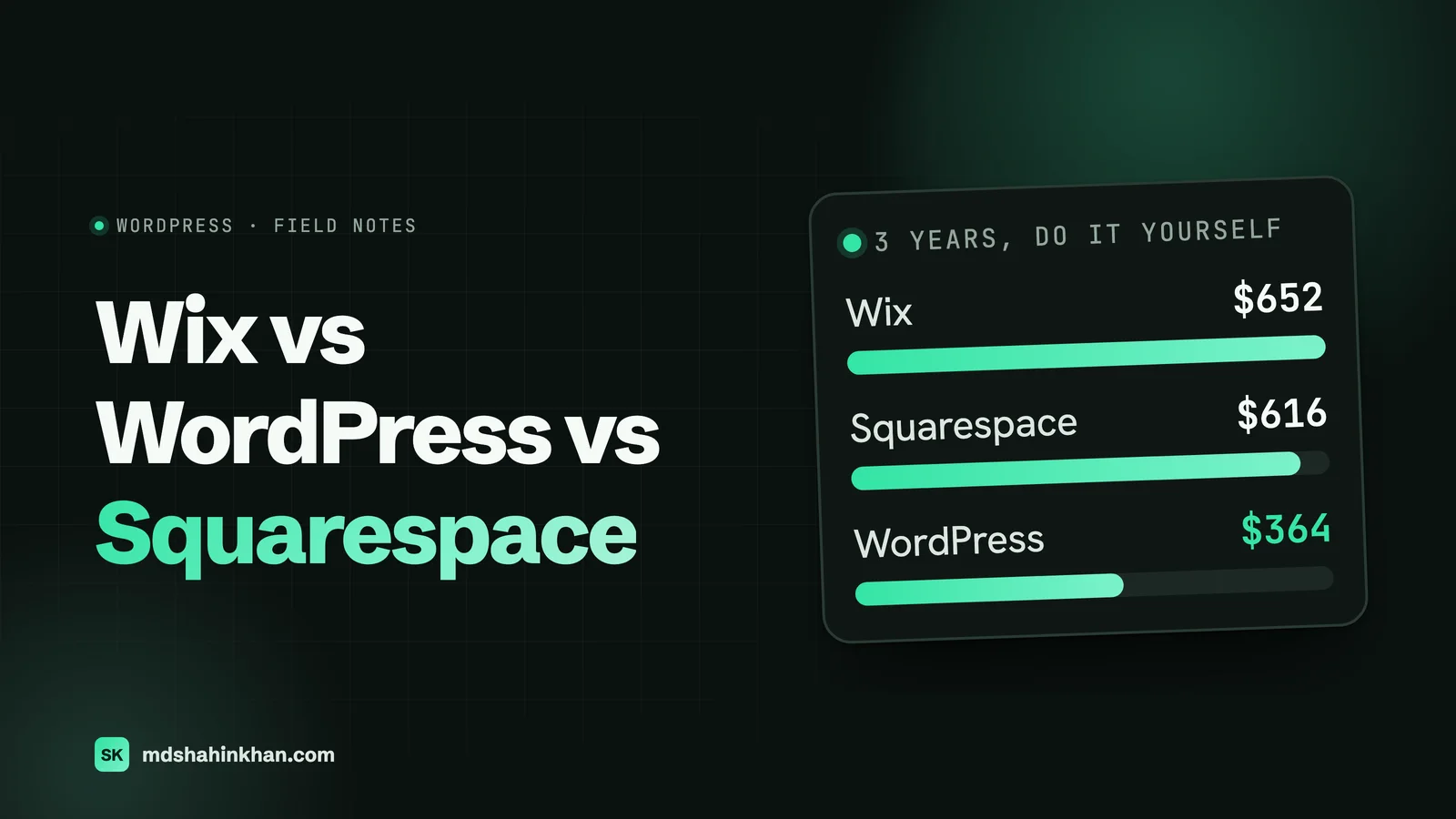
| Total, doing it yourself | $652 | $616 | $364 |
| Maintenance if you pay someone (my assumption: a $75 a month care plan) | Not needed | Not needed | $2,700 |
| Total, with WordPress maintenance paid for | $652 | $616 | $3,064 |
The honest reading of that table: WordPress is the cheapest of the three if someone on your side applies the updates, and by far the most expensive if you pay a developer to do it every month. The page builder licence is optional too; a free theme brings the WordPress column down to $184. From year five the hosting in this example renews at $10.99 a month, about $132 a year, which is still well under either builder.
For the hosting line, I would put a small business site on something like Hostinger’s WordPress hosting. This site runs on Hostinger’s Cloud plan. (That is an affiliate link: if you sign up through it I may earn a commission, at no extra cost to you.) Whichever host you choose, budget for the renewal price, not the first-term price, because almost every host renews higher.
What the table leaves out is the biggest cost of all three: the time to build the site well, whether that is your own evenings or a designer’s invoice. A Wix or Squarespace site built by a professional costs about the same to build as a WordPress site of the same quality. The platform does not make the design work cheaper; it only changes who looks after the site afterwards.
Who Keeps It Running
This is the question that decides most of these comparisons, and the one the feature tables skip.
Wix and Squarespace run the servers, apply security fixes, keep the software current and take backups. You log in, change a price or add a photo, and that is it. Nothing breaks because someone forgot an update. If something does go wrong, there is one company to contact.
WordPress gives you all of that responsibility. WordPress itself, the theme and every plugin get regular updates, and a site that is not kept current becomes a security risk. On a small service site that I maintain, updates, a backup check and a quick look at the forms take about an hour a month. That hour is easy for a developer and a real chore for a busy owner, which is why many WordPress sites end up on a care plan.
So the practical question is not “which platform is better” but “who will look after this site in two years”. If the answer is “nobody”, Wix or Squarespace is the safer choice. If the answer is “me, or a developer I trust”, WordPress stops being a risk.
Design and Flexibility
Wix lets you drag any element anywhere on the page. That is its selling point and its weakness: it is easy to make something that looks right on your laptop and messy on a phone, so check every page in the mobile view. On the standard Wix editor you also cannot switch to a different template once the site is live; a redesign means rebuilding.
Squarespace works in structured sections, so it is harder to break the layout and easier to end up with something clean. The templates are some of the best-looking on any platform, which is why photographers, designers and restaurants like it. The trade-off is that anything outside the section system needs code injection, and some layouts are simply not possible.
WordPress has no ceiling. With a page builder or a custom theme, any design can be built, and the site can grow into things neither builder does well: a directory, a member area, a booking flow tied to your practice software, multiple locations with their own pages, a store. The cost of that freedom is that a WordPress site is only as good as the person who built it.
On extensions: Wix’s App Market covers the common needs (bookings, forms, chat, reviews). Squarespace’s extension list is much shorter. WordPress has tens of thousands of plugins, which is useful and also the source of most WordPress problems: every plugin is code from a different developer that has to be kept updated, so I keep them to the few a site really needs.
SEO: What Actually Differs
The old line that “Wix is bad for SEO” is out of date. All three let you set page titles and meta descriptions, edit URLs, add alt text, connect Google Search Console and produce a sitemap. Wix now even lets you remove the /product-page/ prefix from store URLs and rename the /post/ prefix on blog posts (it cannot be removed). A well-written Wix or Squarespace site can rank for a local search.
The differences show up when SEO is the growth plan rather than a box to tick:
| SEO need | Wix | Squarespace | WordPress |
|---|---|---|---|
| Titles, descriptions, alt text, sitemap | Yes | Yes | Yes, with an SEO plugin |
| Full control of URL structure | Mostly; blog prefix stays | Mostly; collection prefixes stay | Complete |
| Structured data (schema) per page | Basic, with custom markup possible | Basic | Anything, per page and per template |
| Many location or service pages from one template | Possible with dynamic pages | Limited | Easy (custom post types, templates) |
| Redirects when you restructure | Yes | Yes | Yes, unlimited |
| Speed tuning beyond the defaults | Very little you can change | Very little you can change | Everything, including hosting |
| Owning your content long term | Stays on Wix | Partial export | Fully yours |
For a business that wants a presence and gets most customers from referrals or Google Maps, those gaps do not matter much. For a law firm that needs a page for every practice area, or a dental practice with a page for every procedure and a cost page for each, they matter a lot. That structure is what my articles on law firm website design and dental website design are built around, and it is easier to build and keep tidy on WordPress.
Remember too that the website is only half of local search. The map pack is driven by your Google Business Profile, reviews and consistency, and that works the same whichever platform you choose. My local SEO guide for small businesses covers that half.
Speed: The Honest Numbers
Here is a number most WordPress fans leave out. In the HTTP Archive Technology Report for November 2025, reported by Search Engine Journal, 74.86% of Wix sites and 70.39% of Squarespace sites passed Google’s Core Web Vitals, against 46.28% of WordPress sites.
That does not mean WordPress is slow. It means the average WordPress site is built with a heavy theme, too many plugins and cheap hosting, and nobody tunes it. Wix and Squarespace control their whole stack, so their average is higher and their best case is limited. A WordPress site built lean, on decent hosting, with images compressed and scripts kept in check, passes comfortably; the difference is that on WordPress somebody has to do that work.
So if you will build the site yourself and never think about performance, a builder will probably give you a faster site than a DIY WordPress install. If a developer builds the WordPress site properly, speed stops being a reason to choose either way.
What a Local Service Business Needs
Most of my clients are dental practices, law firms and auto service centers, and their sites need a few specific things. Here is how the three handle them.
- A contact form that reaches the right inbox. All three do this well. On WordPress, the email delivery needs setting up properly (SMTP), or form emails land in spam.
- Online booking. Wix has its own booking system on the Business plan; Squarespace sells Acuity Scheduling as an add-on. Most practices already use booking software (dental practice management systems, legal intake tools, shop management systems), and all three can link to or embed it. WordPress can go further and connect the booking directly to the site.
- A page per service and per location. This is where WordPress pulls ahead. A repair shop with twelve services, or a practice with three offices, gets a clean template for each page type instead of copy-pasted pages that drift apart.
- Reviews on the site. All three can show Google reviews through an app or plugin.
- Staff changes. Wix and Squarespace let you add contributors on most plans. WordPress has proper user roles, so the office manager can edit the team page without touching the rest.
- Compliance. Dental and legal sites need privacy notices, accessible forms and, for dental forms, care around patient information. All three can meet the basics; WordPress gives your developer the most control over what each form collects and where it goes.
If you are a dental practice, a law firm or an auto shop, my pages on websites for dental practices, websites for law firms and websites for auto service centers show what I build for each.
What You Can Take With You When You Leave
Nobody thinks about this on day one, and it is the part I see cause the most pain later.
| What you can take with you | |
|---|---|
| Wix | Very little. Wix’s own help pages say a Wix site cannot be exported or hosted anywhere else, and blog posts cannot be exported to other platforms. You can download your product list as a spreadsheet (up to 5,000 rows) and your contacts. Everything else is rebuilt by hand or copied page by page. |
| Squarespace | Some. Squarespace exports an XML file designed for importing into WordPress. It carries your standard pages, one blog with its posts, text and image blocks and gallery pages. It leaves out store pages, product, video and audio blocks, extra blogs, drafts, your styles and any custom CSS. |
| WordPress | Everything. The files and the database are yours, and any host can run them. You can move to another host in an afternoon. |
This matters most for businesses that publish. Five years of blog posts on Wix is five years of content you can only move by copying it out post by post. If your plan is to grow through content, that alone is a reason to start on WordPress.
Wix vs Squarespace, If WordPress Is Off the Table
Plenty of owners decide they do not want to manage WordPress and just need to pick between the two builders. Here is how I would choose.
Choose Wix if you want the most control over layout without code, want to start on a free plan, or need a built-in feature Squarespace does not have (Wix’s booking system, a bigger app market). Be disciplined about the mobile view.
Choose Squarespace if looks matter more than flexibility (a photographer, designer, architect, restaurant or boutique), you want a site that is hard to make messy, or you like a slightly cheaper entry plan. Avoid the Basic plan if you sell products, because of the 2% fee on sales.
On speed there is little between them (74.86% of Wix sites against 70.39% of Squarespace sites passing Core Web Vitals in the report above). On leaving, Squarespace is the better of the two because it at least exports to WordPress.
Which One I Would Pick, by Business
| Your business | My pick | Why |
|---|---|---|
| Law firm that wants cases from search | WordPress | A page per practice area, attorney bios, schema, and room to publish |
| Dental practice with several procedures or offices | WordPress | Procedure pages, cost pages and location pages from clean templates |
| Auto repair shop, one location, owner edits it | Wix or Squarespace is fine | A few pages, hours and services; move to WordPress when SEO becomes the growth plan |
| Photographer, designer, restaurant, portfolio | Squarespace | The best templates, hard to break |
| Brand-new business, $0 to start, will edit it yourself | Wix | Free plan to start, upgrade when it earns its keep |
| Anyone selling products online | None of these first | Compare Shopify and WooCommerce instead |
Most businesses that come to me started on Wix or Squarespace, and that was usually the right call at the time. The mistake is not starting on a builder; it is staying on one after the site has become the main way new customers find you.
When to Move to WordPress
These are the signs I look for when an owner asks whether to move a Wix or Squarespace site:
- You want a page for every service, practice area or location, and the builder turns that into copy-pasted pages.
- Search is now your main source of new customers, and you need control of structure, schema and speed to compete.
- You are publishing regularly and want that content to be fully yours.
- You need something the builder cannot do, such as a directory, a member area or a booking flow tied to your own software.
- You are paying for several apps that add up to more than WordPress hosting and maintenance would.
A move done carelessly loses rankings. Done properly, it keeps every URL that has traffic or links, with redirects for the ones that change, carries over titles, descriptions and images, and gets checked in Search Console after launch. On Wix that means rebuilding the design and copying content by hand; on Squarespace the XML export gives you a head start on pages and posts.
Frequently Asked Questions
What Are the Disadvantages of Wix?
You cannot take your site with you: a Wix site cannot be exported or hosted anywhere else, and blog posts cannot be moved to other platforms. On the standard editor you cannot switch templates after the site is live, the free-form editor makes messy mobile layouts easy, and you have little control over speed and structured data. For most small sites those limits do not matter; for a site that must grow through search, they eventually do.
How Much Does Wix Cost per Month?
Wix has a free plan with Wix ads and a Wix web address. Paid US plans on yearly billing are about $17 a month for Light, $29 for Core, $39 for Business and $159 for Business Elite, or $24, $36, $46 and $172 if you pay month to month. Yearly plans include a free domain for the first year. Prices vary by country, so check Wix’s pricing page for yours.
What Are the Downsides of Using Squarespace?
Squarespace has fewer extensions than Wix or WordPress, so anything outside its section system needs code or is not possible. The Basic plan takes 2% of product sales, there is no free plan, and its export to WordPress leaves out store pages, video and audio blocks, drafts and your design. It is a strong choice for design-led sites and a limiting one for complex or content-heavy sites.
Is WordPress Still the Best Website Builder?
WordPress is not really a website builder; it is the software a site is built on, and it runs 40.2% of all websites according to W3Techs. It is the best choice when you need control, structure and ownership, and a worse choice than Wix or Squarespace when you want no maintenance at all. With a page builder like Elementor, it works much like a drag-and-drop builder for day-to-day editing.
Is WordPress Outdated in 2026?
No. WordPress is still the most used website software by a wide margin, it receives regular releases and security updates, and its editor and page builders are modern. What does look outdated is a WordPress site built years ago on a heavy theme and never updated, which is a maintenance problem, not a WordPress problem.
Why Are People Moving Away From WordPress?
Mostly because of maintenance. Keeping WordPress, the theme and the plugins updated takes time, badly built sites become slow, and hacked sites are almost always ones that were not kept current. Owners who want none of that responsibility move to Wix, Squarespace or a hosted service, which is a reasonable choice for a simple site. Businesses that rely on search usually find the control worth the upkeep.
Is Squarespace Good for SEO?
Yes, for the basics. Squarespace handles titles, descriptions, clean URLs, a sitemap, mobile layouts and SSL, and a well-written Squarespace site can rank for local searches. It gives you less control than WordPress over structured data, URL structure and speed tuning, which matters most for businesses that need many service or location pages.
Is Wix Better Than WordPress?
Wix is better if you want to build and edit the site yourself with no maintenance, and it is faster out of the box than the average WordPress site. WordPress is better if the website has to grow through search, needs custom features, or must stay yours if you change provider. For a business that depends on its website for new customers, I would choose WordPress.
If you are deciding which one to build on, or whether to move the site you have, book a free 30-minute call and I will tell you what I would do in your position, whether or not we work together. You can also see the sites I have built.